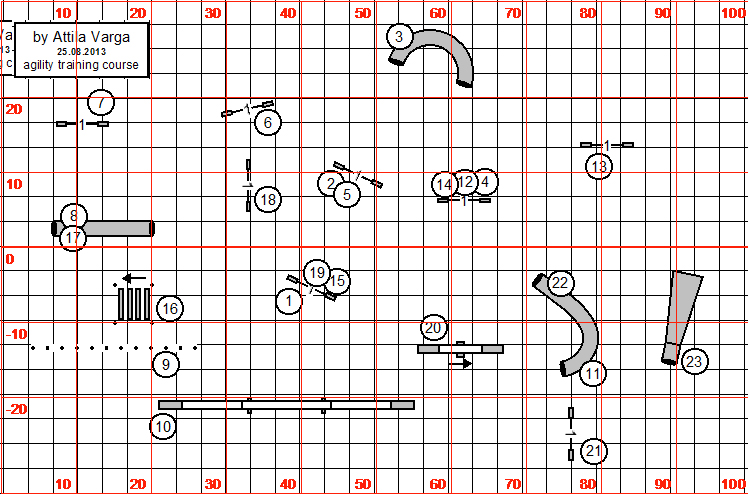
I've been running international courses for a year or two now. Since I can't set a course without my surveyors tape and wheel, I spend a lot of time converting photos of metric course maps to feet in CRCD. I finally decided to try and overlay a grid marked in feet over a metric course map.
The course map I used was in .PNG format, so I converted it to the more common JPEG format in PhotoShop to see if this would work with a JPEG image.
Next I created a 40 meter x 20 meter grid in CRCD.
Then I switched off metric in the view menu and had a blank course map marked off in feet. I saved it in .PNG format so that I would have a transparent background when I removed the white areas.
Then I opened my grid in PhotoShop. In order to work with the image, you have to change from indexed color to RGB and convert the background to a layer. Then you can use the magic wand tool and remove all the white.
Next select Inverse and paint the lines and numbers red to make it easier to see them when you overlay this image on the original course map. Select the entire image and copy.
Paste it over the original course map and voila.
Since I am working in layers, I decided I might as well move the foot grid to the right so that the course fits within an 80x100 foot grid.
Here's my finished course map:
One of the problems with an instructional DVD is trying to locate the exact information you are looking for. You know you saw it, but where. If you're lucky the DVD is divided into chapters and has a menu, but even so, what you're trying to find isn't always in the chapter that you thought it would most likely be in.
Recently, I was torn between auditing another online class and purchasing a DVD covering the same material. I ended up purchasing the DVD so I could watch the material over and over whenever I wanted to. Yesterday, I spent about an hour watching about 10 minutes of my new DVD and then working on what I saw with Belle. Then I compared what we did with what the guy in the DVD was doing. I identified several spots where I got it wrong and went out and tried it again.
This morning, I was re-watching the DVD to see if there were still points I had overlooked. I was about to get out my pen and some paper to make notes when it dawned on me, I could use Word for my notes and just switch back and forth from VLC media player to Word. Then I had an absolute inspiration. I could paste screen shots into the Word document and add notes later. Here's an example:
Not only does this give me the important points of the DVD, it also provides me with where the information is located on the DVD. (If I decide to print a hard copy, I would probably type out the words and eliminate the pictures to save ink.) And of course, I'm not limited to just capturing the titles. If there I'm having problems remembering how to do a certain move, I can take successive screen shots and save them in my Word doc. Then I can load the document into my Samsung Galaxy Tab 5 and take it out with me when I practice.